=SQL_FOR_DATA_ANALYSIS()
You already know SQL. You just call it Excel.
VLOOKUP is a JOIN. A pivot table is GROUP BY. That "quick pull" your boss keeps asking for is about three lines. Learn the rest on real business data, right in your browser. No CS degree, no ads, no table called Employees.
Free. No account. Works on your phone, even on the train.
=VLOOKUP(C2, Products!A:C, 2, FALSE)SELECT o.id, p.name, o.quantity
FROM orders o
JOIN products p ON p.id = o.product_id;12 things you already know
Each lesson starts from a spreadsheet move you've done a hundred times and ends with a quick exercise that checks your answer.
- a sheet→a table01A database is just a stack of spreadsheets
- Filter ▾→WHERE02Filter rows with WHERE
- Sort A–Z→ORDER BY03Sort with ORDER BY
- =SUM()→SUM()04SUM, COUNT and AVERAGE
- =COUNTIF()→WHERE + COUNT05COUNTIF and SUMIF are WHERE plus a total
- PivotTable→GROUP BY06A pivot table is GROUP BY
- Value Filters→HAVING07Filter a pivot table with HAVING
- =VLOOKUP()→JOIN08VLOOKUP is a JOIN
- =IF()→CASE WHEN09IF is CASE WHEN
- Remove Duplicates→DISTINCT10Remove Duplicates is DISTINCT
- =LEFT()→SUBSTRING()11Text functions: LEFT, CONCAT, UPPER, FIND
- =TEXT(date)→strftime()12Dates: months, weeks and days between
Questions your boss will actually ask
Weekly active users, MRR, churn, funnels, cohorts, CAC. Real questions, answered with a query you can read line by line and steal.
- ProductWAU / MAUWeekly and monthly active users (WAU, MAU)
- FinanceMRRMonthly recurring revenue (MRR) by month
- FinanceChurn %Monthly churn rate
- Any metric7-day averageRolling 7-day average
- ProductFunnelConversion funnel
- ProductRetentionRetention by signup cohort
- MarketingCACCustomer acquisition cost (CAC) by channel
- SalesTop 3 per groupTop 3 in every group
- OperationsHours to closeTicket resolution time and throughput
Look it up, minus the ads
Every function, with what it's for, the Excel formula it replaces, how other databases spell it, and an example you can run.
- =VLOOKUP()→JOINSQL JOIN: combine two tables (like VLOOKUP)
- =IFERROR(VLOOKUP())→LEFT JOINSQL LEFT JOIN: keep rows with no match
- =IFS()→CASE WHENSQL CASE WHEN: IF logic in a query
- =IF()→IIF()IF in SQL: IIF, IF() and CASE
- Filter ▾→WHERESQL WHERE: filter the rows you want
- Sort→ORDER BYSQL ORDER BY: sort your results
- PivotTable→GROUP BYSQL GROUP BY: totals per category
- Value Filters→HAVINGHAVING vs WHERE in SQL
- =COUNTA()→COUNT(*)SQL COUNT: count rows, values and blanks
- =UNIQUE()→COUNT(DISTINCT)SQL COUNT DISTINCT: count unique values
- Remove Duplicates→DISTINCTSQL DISTINCT: remove duplicate rows
- Pivot columns→SUM(CASE…)Pivot in SQL: turn rows into columns
- =MID()→SUBSTRING()SQL SUBSTRING: cut out part of text
- =A2&B2→CONCAT()SQL CONCAT: join text together
- =SEARCH()→LIKECheck if text contains a word in SQL
- =B2-A2→DATEDIFFDays between two dates in SQL (DATEDIFF)
- =EDATE()→DATEADDAdd days or months to a date in SQL
- =TEXT()→FORMATFormat dates in SQL (month, year, weekday)
- dragged-down formulas→OVER()SQL window functions, explained simply
- =RANK.EQ()→RANK()RANK, DENSE_RANK and ROW_NUMBER in SQL
- =SUM($B$2:B2)→SUM() OVERRunning total (cumulative sum) in SQL
Free SQL diagrams to save
The ideas people get stuck on, drawn once, properly. Download them, pin them, put them in your team wiki.
Plus two cheat sheets to print: Excel formulas and Excel to SQL.
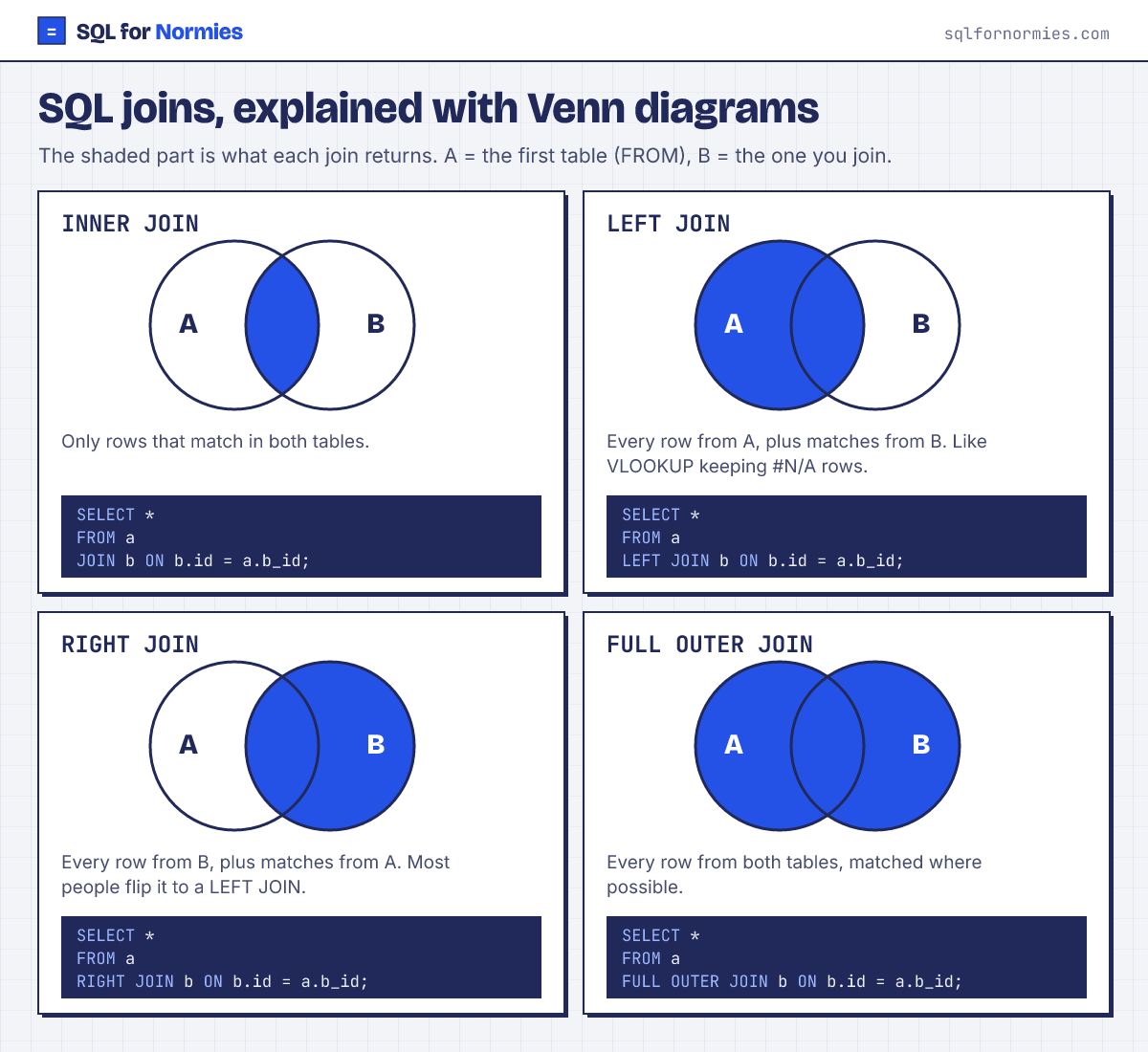
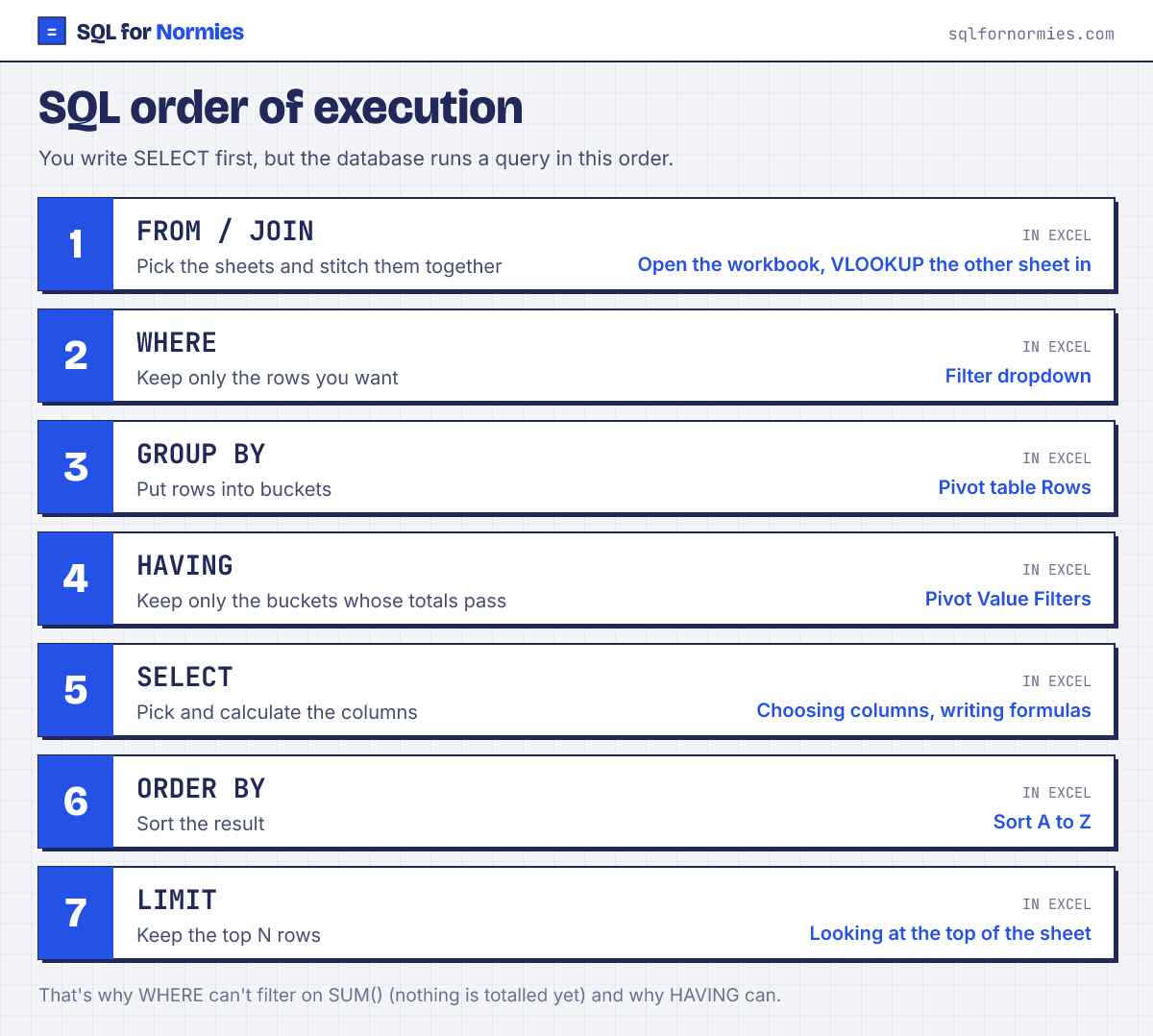
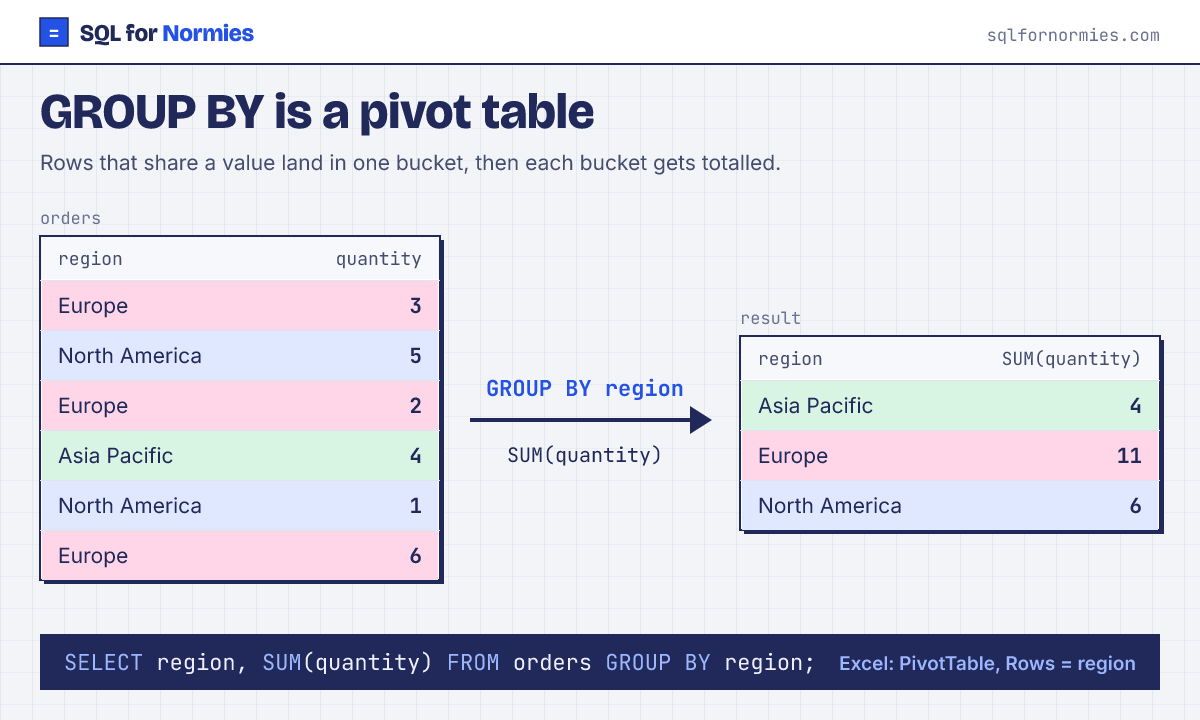
Most SQL tutorials were written by engineers, for engineers, and then wrapped in ads. This one is for the rest of us: marketers, PMs, ops people and founders who live in spreadsheets and keep hearing "just pull it with SQL".
Every query here runs on a real database inside your browser. Nothing you type leaves your device.